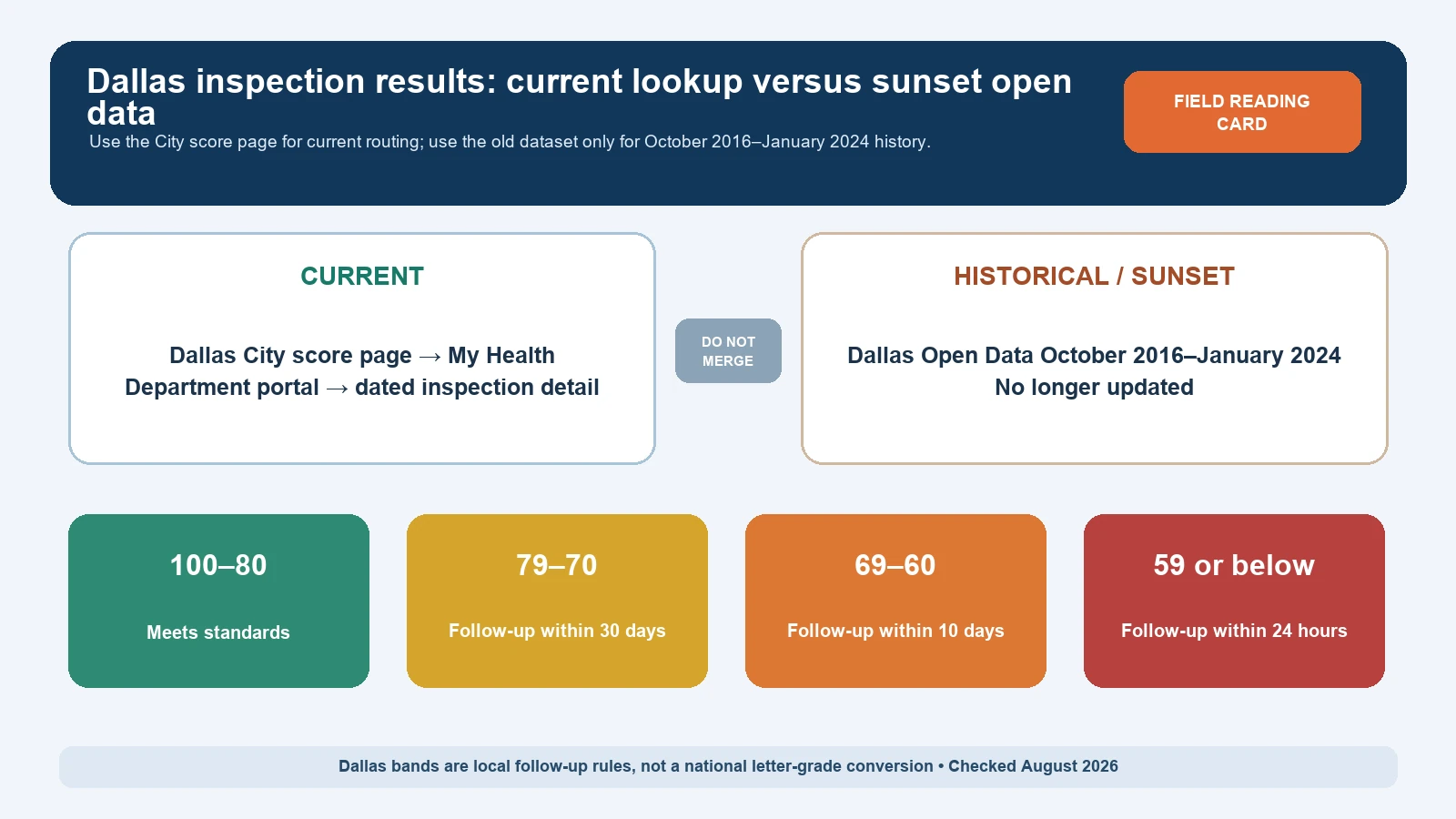
Use Dallas’s current Restaurant Food Scores page to interpret a current score and follow-up window; use the old Dallas Open Data table only for inspections from October 2016 through January 2024. The historical dataset is officially marked sunset and no longer updates. Mixing its last row with the current portal can make an old result look current.
Last checked: August 7, 2026.
The City of Dallas Restaurant Food Scores page supplies the current local score bands and routes readers to the active search. The Dallas Open Data inspection dataset still explains its historical fields, but its own description directs users to the current My Health Department portal for updated information.
Choose the current or historical system before comparing rows
Dallas has two official-looking surfaces because the City preserved the old open dataset after moving current inspection search to another platform. They serve different time periods. A result is not current merely because the old table still loads, sorts, and exports successfully.
| Official surface | Use it for | Time or status | Critical limitation |
|---|---|---|---|
| City Restaurant Food Scores page | Current score interpretation and route to active search | Current policy page; recheck its update date | It is a guide and gateway, not the complete row-level history |
| My Health Department Dallas | Current facility and inspection detail | Active portal linked by the City | Vendor-hosted labels can change; match facility and date before reading |
| Dallas Open Data dataset | Historical inspections and violation fields | October 2016 to January 2024; marked sunset | It no longer establishes the latest inspection |
When a restaurant appears in both systems, create two evidence rows. Label the open-data row historical and the active-portal row current as of its displayed inspection date. Do not merge their fields into one synthetic record, and do not assume a shared name means the operator, permit, or food operation stayed the same.
Dallas score bands describe follow-up timing, not letter grades
Dallas’s official score interpretation guide describes a weighted system that distinguishes critical and non-critical violations. It publishes four numeric bands. These bands communicate whether the City says the establishment meets standards or how quickly a follow-up is required; the page does not convert them into A, B, C, D, or F.
| Dallas score | City description | Reader's next check | What it does not prove |
|---|---|---|---|
| 100-80 | Meets Consumer Health Division standards | Open the dated inspection and read its findings | No violation, no correction, or guaranteed current sanitation |
| 79-70 | Follow-up inspection required within 30 days | Locate the follow-up result and compare dates | That the follow-up already happened or the same score remained |
| 69-60 | Follow-up inspection required within 10 days | Check the active history for the required later visit | Automatic present closure or a national failing grade |
| 59 and below | Follow-up inspection required within 24 hours | Read the detailed enforcement and later status | Permanent closure or an F grade |
A numeric band is only the first layer. The detailed report can show the inspection date, type, cited item, point value, notes, and correction context. A score from a routine visit should not be compared as though it were the same event as a complaint or follow-up inspection.
Repeated Dallas names can represent different records
The City warns that repeated facility names can appear when follow-up inspections are required or when one location contains multiple permitted operations. A grocery store, for example, may have separate meat, seafood, or produce operations. That makes a name-only search especially risky.
- Match the complete street address, including suite or unit.
- Open each operation or inspection row instead of keeping only the highest score.
- Separate Routine, Follow-up, and Complaint visits before comparing scores.
- Use the inspection date to order events; do not sort by score alone.
- Retain the exact program or facility label displayed in the active detail.
- If two records remain indistinguishable, ask Consumer Health which permitted operation each row represents.
The Dallas restaurant inspection search guide covers the facility-finding step. This field guide begins once a result has been opened and the reader needs to decide which visit, score, and operation the row represents.
The historical dataset preserves useful fields, with a sunset warning
The open-data metadata defines Restaurant Name as a program identifier used to distinguish food programs, Inspection Type, Inspection Date, Inspection Score, address components, and repeated sets of violation description, points, detail, and memo fields. It also warns that the data describes a specific period and not establishment ownership or the complete history.
| Historical field | Official metadata meaning | How to use it now | Do not read it as |
|---|---|---|---|
| Restaurant Name / program_identifier | A label that can distinguish programs at one facility | Match it with the full Street Address | Legal owner or unique current permit number |
| Inspection Type | Routine, Follow-up, Complaint, and other described visit categories | Group like visit types before comparing results | A grade or severity label |
| Inspection Date | Date the facility inspection was performed | Keep it attached to the score and violations | The current status date |
| Inspection Score | Aggregate score from inspection violations | Read it with point fields and notes | A simple sum of every displayed violation in all circumstances |
| Street Address and Zip Code | The facility location | Use it to reject same-name false matches | Proof of ownership |
| Violation Description / Points / Detail / Memo | Structured finding and note fields | Read the four parts together for each item | A current unresolved condition |
The metadata notes that not every violation shown necessarily produces a point deduction because establishments may correct violations during the inspection. Therefore, subtracting every visible points field and accusing the dataset of a bad total can be wrong. Read the memo and report context before reconciling the score.
Inspection Type changes the question you are answering
The historical metadata describes routine visits as recurring inspections, follow-up visits as responses to poor sanitation issues or low scores, complaint inspections as investigations of reported concerns, and separate temporary or mobile contexts. Those categories are not interchangeable performance samples.
For a current decision, start with the latest routine inspection, then look forward for a complaint, follow-up, or enforcement record. If a newer follow-up exists, pair it with the inspection that triggered it. If a complaint inspection has no comparable score, do not copy the prior routine score into the complaint row.
| Visit pattern | What the sequence can show | Question still open |
|---|---|---|
| Routine only | The published baseline for a dated visit | Whether later activity is pending or not yet published |
| Routine then Follow-up | A compliance sequence that should be read together | Which findings were corrected and whether another visit was ordered |
| Complaint then Follow-up | An agency response to a reported concern and later review | Whether the complaint was substantiated and what final action occurred |
| Multiple operations at one address | Separate permitted food programs may have separate rows | Which program matches the restaurant operation the reader means |
A missing Dallas listing has several possible causes
The current City page says a restaurant may be absent because of a recent ownership change, remodeling or construction, or a newly opened facility awaiting its initial inspection. Spelling, trade-name changes, and the switch from the historical dataset to the active portal can add other search problems. None of those possibilities should be presented as the confirmed reason until the City says so.
- Search the active portal first for a current question.
- Try the street address if the storefront name returns nothing.
- Check the sunset dataset only when the desired visit falls within its historical window.
- Record the exact query, portal, and access date for every no-result attempt.
- Ask whether a new owner or permitted operation has a different record name.
- Use the City’s contact or report-request path when the detail is necessary for a safety or business decision.
A blank search result is an evidence gap, not a clean bill of health. The guide to restaurant inspection dates helps separate the inspection date from publication and access dates, while the reinspection and follow-up guide helps organize a later visit.
Record Dallas evidence without blending the two systems
A source-dated ledger prevents the most common error: presenting the sunset dataset’s final row as the latest City result. Keep one row per visit and one source URL per row. If the active and historical systems use different field labels, preserve both labels rather than forcing a single vocabulary.
| Ledger item | What to enter | Quality check |
|---|---|---|
| System | Current City route, active portal, or sunset open data | The record’s time coverage is explicit |
| Facility | Displayed operation name and complete address | The result is not matched by brand alone |
| Visit | Inspection Type and Inspection Date | Routine, follow-up, and complaint visits remain distinct |
| Result | Inspection Score and the City band, if applicable | No invented letter grade appears |
| Findings | Violation description, points, detail, memo, and correction context | The score is not reverse-engineered from partial fields |
| Sequence | Triggering visit, required window, later visit, and outcome | A required follow-up is not described as completed without a record |
| Freshness | Dataset end date, visit date, and access date | Historical evidence cannot masquerade as current |
What a Dallas score does not prove
The City describes an inspection score as a snapshot of operational and sanitation conditions during that inspection. It does not prove the restaurant is currently safe, predict every future service period, establish ownership, or provide the full history of each operation. A score in the 100-80 band also does not mean no violation appeared.
Do not compare Dallas bands directly with Austin’s passing line or Georgia’s A/B/C/U grades. Dallas ties its bands to local follow-up timing. Another jurisdiction may score different items, correct them differently during the visit, publish a different report type, or use a different enforcement sequence.
Questions about Dallas result fields
Is the Dallas Open Data table still current?
No. The dataset identifies itself as sunset and says it will not update further. Its title and description limit it to October 2016 through January 2024 and route readers to the current portal.
Does an 85 equal a B in Dallas?
The City page says scores from 100 through 80 meet Consumer Health Division standards. It does not label that band B. Keep the numeric score and Dallas wording.
Why are there two Dallas records at the same address?
The City says repeated names can reflect follow-up inspections or multiple permitted operations at one location. Match the operation label, visit type, date, and detailed record before choosing a row.
Can the violation points always be added to reproduce the score?
Not necessarily. The historical metadata says some violations corrected during the inspection may not reduce the overall score. Read the detail and memo fields instead of assuming a simple total.
Scope: Dallas Consumer Health inspection-score interpretation and the separation of current results from the sunset open dataset. This independent guide is not a City database and does not issue scores. Official sources last checked 2026-08-07.