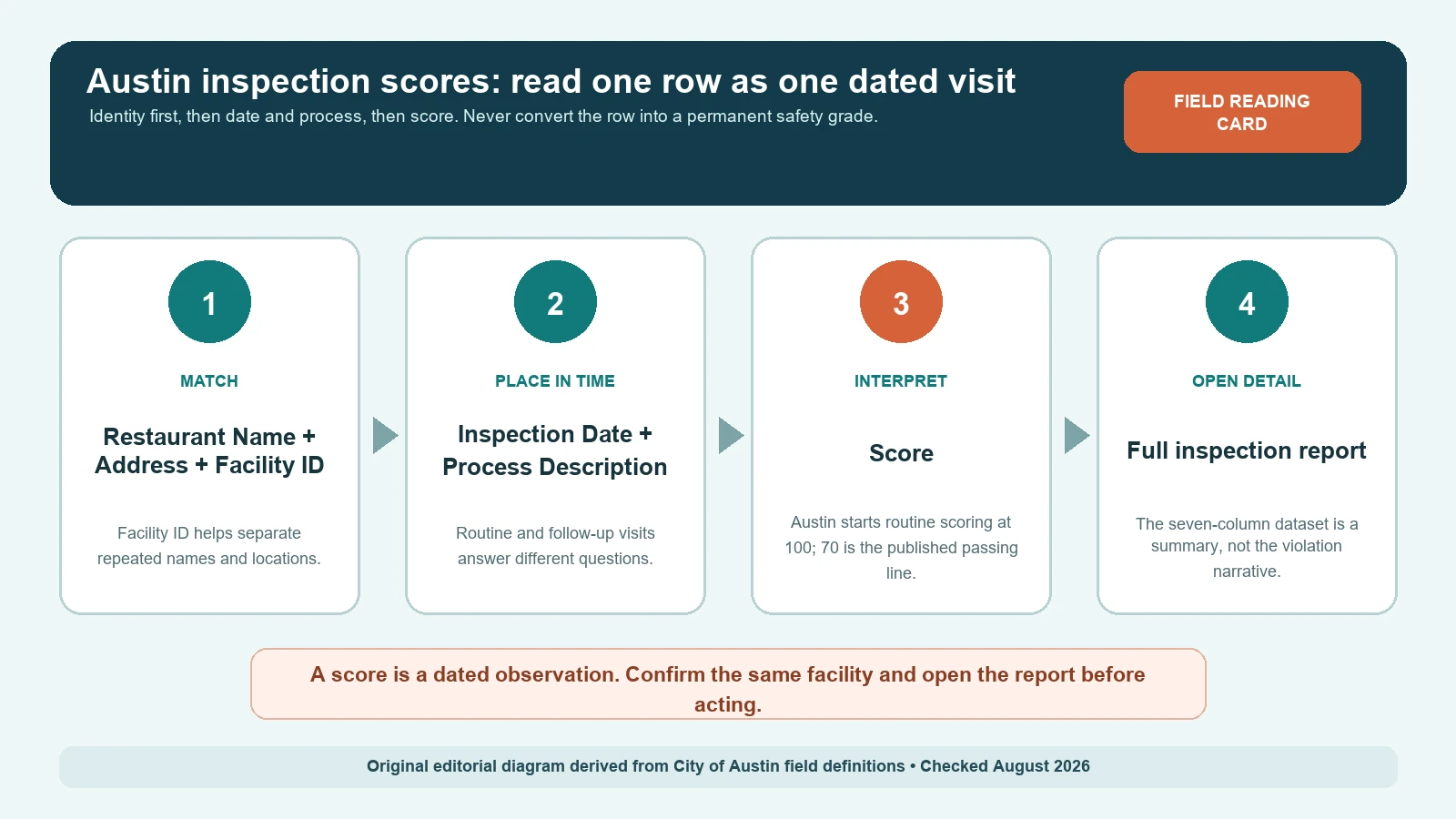
To check an Austin restaurant inspection score, search Austin Public Health’s Food Establishment Inspection Scores table on the City of Austin Open Data portal by restaurant name or address, then match the Facility ID before reading the score.
To open the inspection report behind a score, use Austin Public Health’s Check Inspection Reports portal: search for the establishment, or browse inspections filtered by date range and purpose (routine, follow-up or compliance).
City of Austin Open Data and Austin Public Health pages checked October 24, 2026.
The City of Austin Food Establishment Inspection Scores story explains the local scoring context, while the official seven-column dataset supplies the public fields. The dataset covers inspections performed within the last three years and is a summary. A reader who needs the findings behind a score should follow the city’s route to the full report rather than inventing a violation story from the number alone.
Start with the seven fields Austin actually publishes
Austin’s dataset is unusually compact. That makes it easy to scan and easy to misuse. Each row represents an individual inspection, not a restaurant profile that permanently replaces every earlier row. Keep the labels exactly as published so another reader can reproduce the same lookup.
| Austin field | What it identifies | How to use it | What it does not establish |
|---|---|---|---|
| Restaurant Name | The name attached to this inspection row | Use it as a candidate match, then confirm the address and Facility ID | That every similarly named location is the same establishment |
| Zip Code | The postal code published with the record | Use it to narrow names that repeat | The full street-level match |
| Inspection Date | The date of this visit | Sort visits by date before comparing scores | The date conditions changed or were corrected |
| Score | The numeric result for this inspection | Read it with the visit type and full report | A permanent grade or current safety guarantee |
| Address | The location attached to the row | Compare the number, street, suite, and city | That a current storefront name has not changed |
| Facility ID | Austin’s numeric facility identifier; metadata labels its source field FOLDERRSN | Use it to group rows that belong to the same facility | Ownership, permit approval, or an endorsement |
| Process Description | The published visit description | Separate Routine Inspection from Follow-Up Inspection | The complete reason for every agency contact |
A name-only match is weak evidence in a city with chains, food halls, airport concessions, school kitchens, and renamed businesses. If the restaurant name looks right but the address or Facility ID differs, stop. Open both candidate histories instead of choosing the higher or newer score.
Austin's score starts at 100, but 70 is not a universal grade
According to the Austin Public Health program explanation, routine inspections start at 100 and points are counted down as violations are observed. The same source identifies 70 or above as passing. That rule belongs to Austin’s program; it should not be converted to another city’s A, B, C, color, placard, or closure scale.
| Published result | Austin-specific reading | Next record to open | Do not conclude |
|---|---|---|---|
| 70 through 100 | The program story describes this as passing | The dated full inspection report and any later visit | No violations occurred, every item was corrected, or present conditions are guaranteed |
| Below 70 | The current inspection form describes a scored follow-up path | The follow-up inspection and compliance history | The business remains closed now or that every later visit also failed |
| Below 50 | The current Austin form describes an immediate 48-hour closure and reinspection response | The closure, reinspection, and permit-action record | A universal national rule or a permanent status |
| Blank score | No numeric value is supplied in that row | Process Description and the detailed report | Zero, 100, pass, fail, or missing inspection |
The enforcement details above come from Austin’s Retail Food Establishment Inspection Report form, not from a national grading table. Forms and compliance procedures can change. Check the live form and later inspection history before relying on a threshold for a current decision.
Restaurant Inspection Check tool · rules checked October 21–23, 2026
Inspection score reader
Pick the program that inspected the restaurant, then enter what the report or door sign shows. The reader explains it on that agency's own scale and tells you what usually happens next.
Where Austin inspection scores landed over the past year
We counted every routine inspection score Austin Public Health published from October 1, 2025 to September 24, 2026, the latest inspection date in the file (Austin Open Data, Food Establishment Inspection Scores, pulled October 23, 2026). That covers 6,643 routine inspections at 4,751 food establishments of every type; the file has no restaurant-only field. The figures below are our own count, grouped by the dataset’s own color categories.
| Dataset category | Score | Routine inspections | Share |
|---|---|---|---|
| Green | 90–100 | 4,412 | 66% |
| Yellow | 70–89 | 2,198 | 33% |
| Red | Under 70 | 33 | 0.5% |
- The typical Austin score is in the 90s. The median routine score was 93, and a perfect 100 was the most common single score (618 inspections). A score in the 70s is well below what most Austin establishments receive.
- One score is a snapshot. Of 1,614 establishments with two or more routine inspections in the period, 337 (21%) moved between color categories, and 135 (8%) saw their latest two scores differ by 10 points or more. The typical change was 3 points. Read the last two scores together.
- Red scores are rare, and follow-up rows are few. 33 routine inspections scored under 70, and the file lists 30 follow-up inspections in the same period. If an establishment shows a red score, ask Austin Public Health for the follow-up report instead of waiting for a new row.
Limits: the file was last updated October 15, 2026 and holds scores only; the violations behind a score are in the full report from Austin Public Health.
Process Description tells you what kind of comparison is fair
In the dataset metadata reviewed on August 7, 2026, Process Description contains Routine Inspection and Follow-Up Inspection. A routine visit is the better starting point for a baseline, while a follow-up is tied to an earlier compliance sequence. A follow-up row should not silently replace the original row; the pair tells a story that neither row tells alone.
Suppose a facility has an older routine score, then a newer follow-up entry. Record both dates and both process descriptions. If the follow-up has no score, do not fill the blank with the previous number. Open the report to learn what the inspector checked, what was corrected, and whether another visit was scheduled. Conversely, do not call a routine score the latest status without checking for a later follow-up.
| Sequence seen | Reasonable reading | Evidence still needed |
|---|---|---|
| Routine only | A dated baseline inspection appears in the summary | Detailed findings and any later unpublished or newly posted activity |
| Routine, then follow-up | The facility entered a correction or verification sequence | Both reports, correction status, and any next date |
| Several routine rows | The dataset shows inspection history over time | Facility ID match and an explanation for any abrupt address or name change |
| Follow-up with blank score | A follow-up occurred but this summary does not supply a score | The full report; never substitute zero or the prior score |
The seven-column row is a route to the report, not the report itself
The score table does not publish violation descriptions, point deductions, correction-at-inspection notes, employee observations, temperature readings, or the inspector’s narrative. Those details matter because two identical scores can arise from different findings, and an item corrected during the visit can have a different practical meaning from an unresolved item with a scheduled follow-up.
Use the separate Austin restaurant inspection search guide when you still need to find the correct establishment and open its detail page. Once the report is open, the food inspection violations guide helps distinguish the cited rule, observation, correction, and follow-up. Keep the official Austin report as the evidence; the guides explain how to route and read it.
Use Facility ID to survive name changes and duplicate storefronts
Facility ID is the strongest grouping field in the public Austin table, but it is not magic. A changed operator, remodeled space, new permit, or data correction can produce a break that needs explanation. Start with the ID, then check whether name and address remain coherent across the dates you are comparing.
- Copy the Facility ID exactly; do not drop digits or add commas.
- Confirm the full address, including suite or building text, before grouping two rows.
- Sort by Inspection Date and retain Process Description beside every score.
- Flag a name change instead of rewriting older rows to the current trade name.
- If one address contains several food operations, require a matching Facility ID for each operation.
- Save the official URL and checked date with the extracted row.
A reader comparing a restaurant before and after a sale should not assume the public row proves who owned the business. The dataset’s job is to publish inspection scores, not ownership history. When ownership is material, ask Austin Public Health which permit or public-record source carries that question.
When an Austin result looks missing, stale, or contradictory
Austin says the dataset covers the last three years and its metadata identifies a biweekly update schedule. A very recent inspection may therefore appear first in the full-report system or may not yet be reflected in the open-data table. An older inspection can also fall outside the rolling window. Neither condition proves that no inspection occurred.
- No name result: try the street address and a distinctive part of the licensed name.
- Several name results: use address, Zip Code, and Facility ID together.
- A recent report is absent: note the dataset’s update timing and check the full-report portal.
- The score and report appear inconsistent: record both URLs and dates, then ask the agency which record is current.
- A restaurant moved: treat the old and new addresses as separate candidates until Facility ID and agency records connect them.
- A follow-up appears without a routine row: the earlier visit may be outside the window or require a records request.
Inspection date is not a decorative field. The guide to why restaurant inspection dates matter explains how publication date, visit date, and the date you checked the source can diverge. Save all three when possible.
Build a source-dated Austin evidence note
A useful note lets a second person reproduce the match without trusting your conclusion. Separate copied evidence from interpretation. If a field is blank, write blank; if the report is unavailable, write unavailable at the checked time. Do not repair the agency record inside your own table.
| Evidence item | Value to preserve | Why it matters |
|---|---|---|
| Source | Austin official dataset | Keeps the issuing authority and live route visible |
| Facility match | Restaurant Name, Address, Zip Code, Facility ID | Shows why the row belongs to the intended location |
| Visit context | Inspection Date and Process Description | Prevents a follow-up from being mistaken for a routine baseline |
| Displayed result | Score exactly as published, including a blank | Separates evidence from assumptions |
| Detail checked | Full-report URL, findings reviewed, later visit found | Documents whether the summary was expanded |
| Dates | Inspection date, source update date, access date | Exposes lag and stale evidence |
| Open question | Specific mismatch or missing field | Creates a precise agency inquiry instead of a broad accusation |
What an Austin inspection score cannot tell you
A passing score does not certify that every meal will be safe, that conditions remain unchanged, or that the establishment has no complaint history. A low historical score does not prove that the same conditions remain today. The record documents what the agency observed and recorded for a particular visit under Austin’s rules.
Do not rank Austin restaurants against Dallas, Atlanta, New York, or another jurisdiction by subtracting or converting scores. The inspection forms, deduction rules, follow-up triggers, publication windows, and placard systems differ. Even inside Austin, compare rows only after matching the same Facility ID and identifying routine versus follow-up visits.
Questions readers still have after finding the row
Is 70 an Austin restaurant letter grade?
No. Austin’s program story calls 70 or above passing, but the public dataset publishes a numeric Score field rather than a national letter-grade conversion. Preserve the number and Austin’s definition.
Why can the same Austin restaurant appear more than once?
Each row is an individual inspection. The same Facility ID can therefore have multiple routine and follow-up rows across different dates. Repeated names can also represent different addresses or food operations, which is why the ID and address must be matched.
Does a blank score mean the restaurant failed?
No. It means the summary row does not supply a numeric score. Read Process Description and open the detailed report. Do not convert a missing value to zero, pass, or fail.
How current is the Austin dataset?
The dataset description covers the last three years, and its metadata identifies a biweekly publishing schedule. Always check the live updated date and the full-report system because timing and retention can change.
Scope: Austin Public Health inspection records and the fields published in the City of Austin dataset. This independent guide does not issue scores, inspect restaurants, or guarantee present conditions. Official sources last checked 2026-08-07.