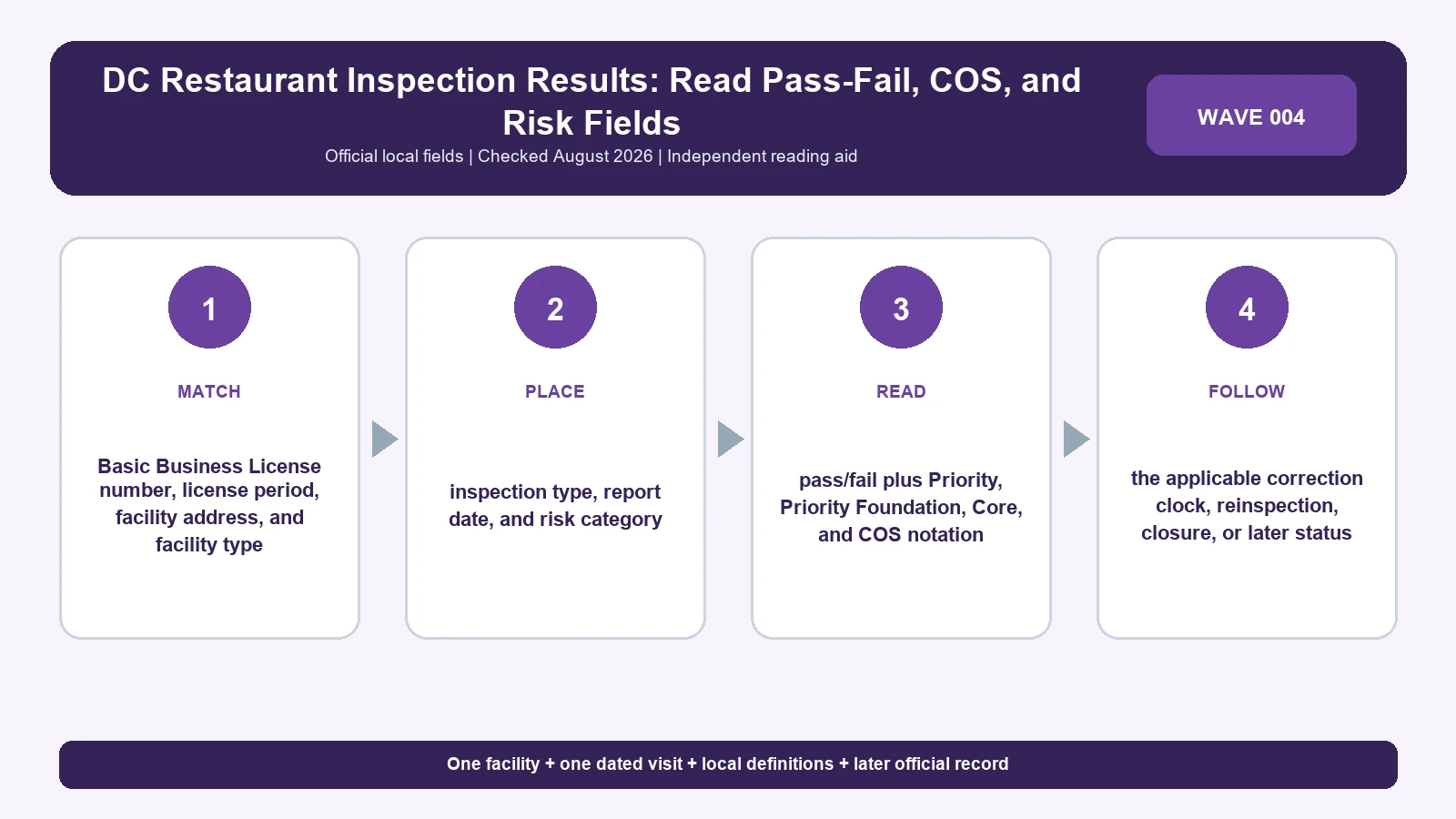
A DC restaurant inspection report shows Pass or Fail, with no letter grade, percentage, or consumer rating. Match the establishment and Basic Business License, note the inspection type and risk category, then read Priority, Priority Foundation, Core, and Corrected On Site fields item by item.
Find the official access route at DC Health Food Establishments. Use DC Health guide to food establishment inspections to decode the report header and violation categories, and keep DC Health Division of Food as the responsible program entry point. For the city’s result, rely on these DC Health pages and the report itself over a review platform, window photo, or search snippet.
Verify the DC establishment through its report header
DC Health reports include establishment name, address, telephone number, Basic Business License number and license period, establishment type, inspection type, email, and risk category. Use the BBL and address as the strongest public match. A familiar trade name alone can point to another branch or an operation that occupied the address during a different license period.
| Header field | What to preserve | What it helps you do | Common misreading |
|---|---|---|---|
| Establishment name | Exact name on the report | Locate the candidate business | Every similarly named branch shares the result |
| Address and phone | Complete location and listed contact | Confirm the physical operation | The phone proves ownership |
| BBL number and period | License identifier and covered dates | Separate license histories | Registration guarantees food safety |
| Establishment type | DC’s operation label | Explain facility context | It is a cuisine rating |
| Inspection type | Purpose of the visit | Separate routine and follow-up events | It is the pass-fail outcome |
| Risk category | Program category on the report | Understand oversight context | A restaurant grade |
If the BBL changes, keep the new report separate from the old one until you have evidence the operator is the same. The address may be stable while the legal operator changes. Show both license periods and describe the evidence for continuity. If the report lacks a field, mark it blank rather than copying one from a different date.
Read pass or fail as DC Health defines it
Use the exact pass-fail language on the selected report. Turning a violation count into A, B, or C, or borrowing another city’s threshold, produces a grade that appears nowhere in DC’s system.
| Displayed result | Local meaning | Next field to inspect | Common misreading |
|---|---|---|---|
| Pass | DC’s outcome for that inspection | Violation rows, COS marks, and inspection type | Permanent safety certificate |
| Fail | DC’s outcome for that inspection | Uncorrected Priority and Priority Foundation items and required action | Automatic permanent closure |
| COS | Named violation corrected during the inspection | Other items on the same report | The report had no violations |
| Reinspection possible | Selected uncorrected items require later verification | Correction date and later report | The business remains failed forever |
| No grade | DC publishes pass-fail only, with no A-to-F or percentage conversion | Use the exact report | Create an editorial score |
A Pass report can still list cited items that were corrected onsite. A Fail report describes that visit; whether the establishment later corrected the conditions shows up in a later official record. Keep the visit date and subsequent official record beside every summary.
Separate Priority, Priority Foundation, and Core
DC Health counts violations in three categories. Priority items directly address hazards associated with foodborne illness or injury; Priority Foundation items support control of those hazards; Core items cover broader sanitation and operational requirements. Use the official report’s category, code citation, observation, and correction state rather than guessing category from ordinary language.
| DC category | Correction horizon in current DC guidance | Evidence to quote | Keep in mind |
|---|---|---|---|
| Priority | Maximum five calendar days when not corrected onsite | Rule, observation, COS or due date | Closure needs a separate DC action |
| Priority Foundation | Maximum five calendar days when not corrected onsite | Rule, observation, COS or due date | Shorter correction window than Core |
| Core | Maximum fourteen calendar days when not corrected onsite | Rule, observation, correction instruction | Still requires correction |
| COS | Resolved during the visit for the marked item | Item-specific notation | Covers the marked item only |
Older DC material may use legacy critical and noncritical terminology with different correction wording. A legacy 45-day noncritical rule belongs with reports from that era; current reports use the Priority, Priority Foundation, and Core system. Date the rule source and keep historical vocabulary with the report from that period.
What Corrected On Site (COS) means on a DC report
Corrected On Site means the inspector recorded that the named violation was corrected during that inspection. DC Health says a COS item does not count toward possible reinspection. Each COS mark covers one item; other violations and the pass-fail label stand on their own.
The food inspection violation guide helps separate category, observation, and correction. If you keep notes on a DC report, give each violation its own row with a COS column, and keep the original observation next to its onsite correction.
What DC’s risk category tells you about an establishment
Risk categories reflect the establishment’s operation and inspection needs. They give context for oversight rather than a measure of customer satisfaction or relative safety, so keep the risk category with the facility details and apart from pass-fail results.
An establishment type or process can change between license periods. If the risk category changes, record the new date and verify whether the same BBL history continues. Avoid explaining the change unless DC Health supplies that reason.
How to note a DC inspection result in one record
A useful record of a DC inspection captures the header, visit, violation categories, and follow-up status. A screenshot helps, and the direct report URL lets someone else check your reading.
| Card section | Fields | Why it helps |
|---|---|---|
| Identity | Name, address, phone, BBL, license period | Matches one licensed operation |
| Context | Establishment type, risk category | Explains the inspected facility |
| Visit | Inspection date and type | Anchors the pass-fail result |
| Result | Exact pass or fail label | Keeps DC’s exact wording |
| Violation row | Category, code, observation, COS, correction due | Shows why follow-up may occur |
| Later event | Reinspection, action, or current unknown | Keeps dated history visible |
| Provenance | DC URL and access date | Allows replication after updates |
Where a field is blank, write blank rather than zero violations, no action, or no license. If two official DC pages conflict, save both access dates and ask the Division of Food which record controls before making a status claim.
When DC Health closes a restaurant for an imminent health hazard
DC identifies conditions that can create imminent health hazards, including loss of hot water, sewage problems, utility failures, fire, vermin, contaminated food, outbreaks, inadequate refrigeration, and flooding. Such circumstances can support immediate closure or license suspension. Closure or suspension appears as its own DC action; a Fail label or violation count shows findings.
When the report contains an operational action, use the restaurant closure and permit-suspension guide and note the DC action date. Without such an action, read the report as inspection findings.
What a DC Health report records about one visit
A DC Health report can document what the agency recorded for a named establishment and date. Later conditions, complaints, food quality and recalls fall outside that record, so check DC Health’s notices for anything after the visit date.
For the initial record search, use the live DC inspection lookup guide. Read in this order: BBL and address, license period, visit type, pass-fail result, category-level findings, COS, correction deadline, and later official event.
DC inspection questions
Can I turn pass into an A?
No. DC Health says its system is pass-fail and does not issue grades, percentages, or ratings.
Does COS remove the violation from the report?
No. Preserve the observation and the item-specific onsite correction.
Does a Priority violation always close the restaurant?
No. Read the report’s correction and action fields. Closure requires an explicit agency action.
Checklist for reading a DC pass-fail report
Read the complete header first: establishment, address, BBL number and license period, establishment type, inspection type, and risk category. Then verify the exact pass-fail result and each Priority, Priority Foundation, or Core item. A COS mark belongs to one violation, and the observation stays on the record.
- Match the BBL and license period across the selected report.
- Quote pass or fail exactly as DC displays it.
- Keep violation category, code, observation, and COS together.
- Apply current five- and fourteen-day rules only to their categories.
- Treat risk category as facility context.
- Require explicit DC action before using closure language.
If you’re reading an older DC report that uses critical and noncritical terms, keep its original wording and look up the rule from that period before citing a correction deadline.
DC Health food establishment pages checked August 7, 2026.